
Best AI Agent Integrations for Sales Teams (2026)
The 10 best AI agent integrations for sales teams in 2026. Compare MCP servers from HubSpot, Salesforce, Zapier, Attio, and Parsley.
AI agents are no longer experimental for sales teams - they are becoming the primary interface for pipeline intelligence, lead scoring, and deal preparation. The best AI agent integrations connect your existing sales tools directly to assistants like Claude, ChatGPT, and Cursor so you can query your data through conversation instead of clicking through dashboards.
This guide covers the 10 best integrations available in 2026, how they work, and which ones matter for your sales workflow.
The shift to agent-first sales workflows
The data is clear: sales teams are adopting AI agents faster than almost any other business function.
McKinsey's "Agents for Growth" research found that effective AI agent deployments deliver productivity improvements of 3-5% annually and can lift revenue growth by 10% or more. Their data shows marketing and sales is one of the primary value pools in that $2.6-4.4 trillion opportunity.
And it is already happening. McKinsey's State of AI survey shows marketing and sales is one of the top business functions for AI agent adoption - with the majority experimenting or piloting:
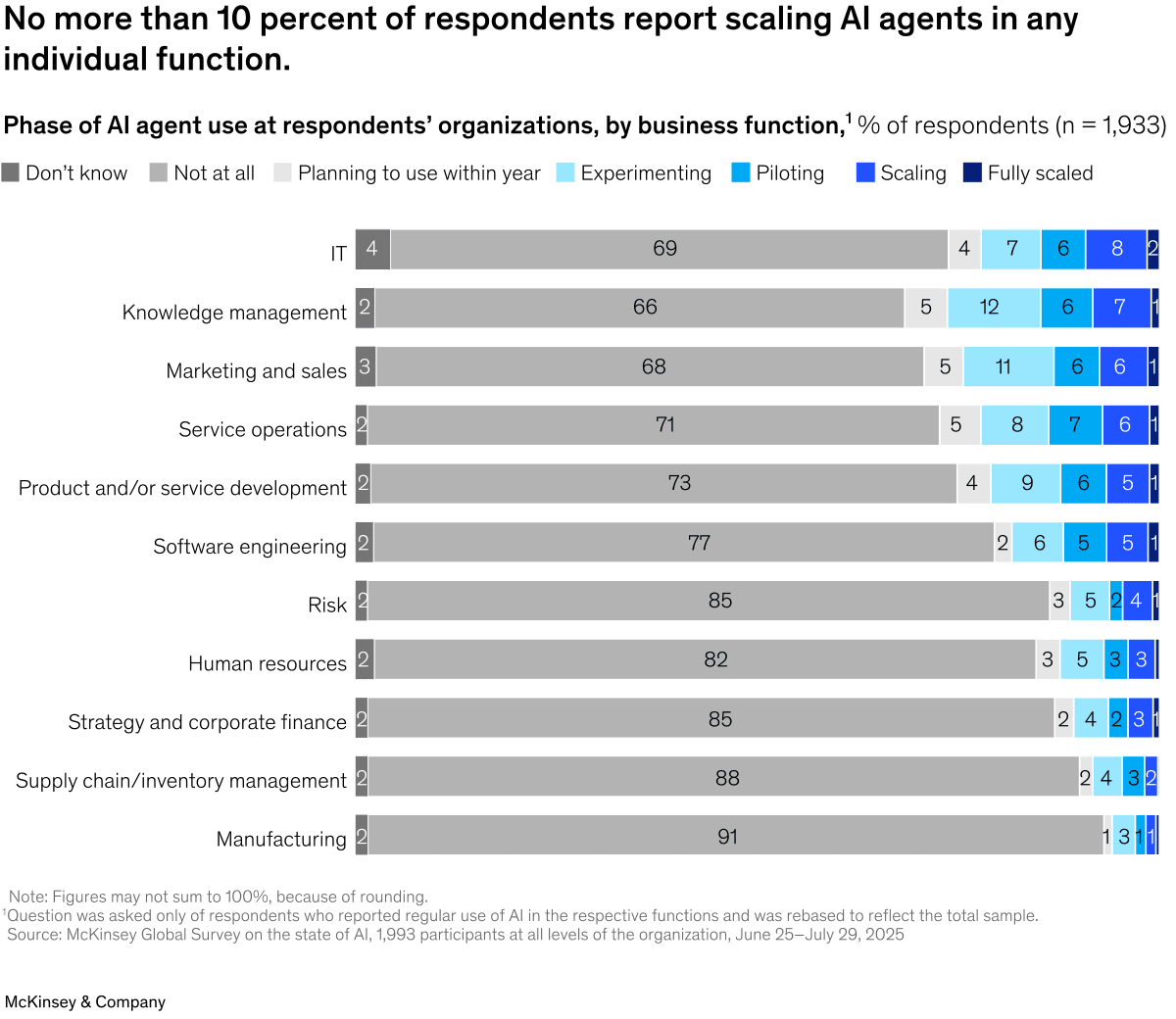
Source: McKinsey Global Survey on the State of AI, November 2025. 1,933 respondents across all levels of the organisation.
The shift is being powered by a protocol called MCP (Model Context Protocol) - an open standard that lets AI assistants connect to external tools and data sources. Think of it as USB-C for AI: one universal connector that works with any assistant.
How AI agent integrations work
Most of the integrations in this guide use MCP - the Model Context Protocol developed by Anthropic and now supported by OpenAI, Cursor, Windsurf, and a growing number of AI platforms.
Add the integration to Claude Desktop, ChatGPT, Cursor, or any MCP-compatible assistant. Usually a one-line config change.
Connect with an API key or OAuth. The AI assistant stores credentials locally - your data stays between your machine and the service.
Ask natural language questions. The AI calls the right tools, combines data from multiple sources, and returns actionable answers.
The real power comes when you connect multiple integrations. Your AI assistant can cross-reference your CRM pipeline with your buyer intent data, your email engagement, and your calendar - all in a single conversation.
The best AI agent integrations for sales teams
1. HubSpot
What it does: Full CRM access - contacts, companies, deals, tickets, engagements, and pipeline data.
Best for: Teams already on HubSpot who want to query their CRM through natural language instead of building reports.
Key capabilities:
- Search and filter contacts, companies, and deals
- Create and update CRM records
- Query pipeline stages and deal values
- Pull engagement history and activity timelines
Setup: OAuth via HubSpot's official MCP server. Available on Smithery and as a local install.
2. Salesforce
What it does: Query Salesforce objects, run SOQL queries, and manage records through conversation.
Best for: Enterprise teams with complex Salesforce configurations who spend too much time building reports and dashboards.
Key capabilities:
- Run SOQL queries against any Salesforce object
- Search across contacts, leads, opportunities, and accounts
- Create and update records
- Pull forecast and pipeline analytics
Setup: OAuth authentication. Multiple community MCP servers available, with an official Salesforce integration expected in 2026.
3. Parsley
What it does: Query buyer intent signals, MEDDIC qualifications, lead scores, and conversation intelligence from your Parsley account.
Best for: Sales teams who use Parsley's AI chatbot on their profile and want to query visitor intent data alongside their CRM.
Key capabilities:
- Get hot leads with MEDDIC evidence (
get_hot_leads) - Search conversations by intent signal or MEDDIC criteria (
search_by_intent) - Surface unanswered visitor questions for content strategy (
get_knowledge_gaps) - Prep for calls with full conversation context (
deal_prepprompt) - 8 tools + 5 workflow prompts including morning briefing and stale leads check
What makes it different: Parsley is the only MCP integration focused on pre-conversation buyer intent - the signals visitors reveal before they ever talk to a rep. Combined with a CRM MCP, your AI assistant can cross-reference "who showed intent on my profile" with "who hasn't been contacted in my CRM" automatically.
Setup: API key from parsley.id/hub/developers. Available on Smithery and as a local install. Analytics tool runs on every account; the other 7 tools draw from your conversation balance (10 free starter conversations).
Query your buyer intent through conversation
Connect Parsley's MCP server to Claude Desktop in under 2 minutes. 8 tools for lead intelligence, MEDDIC data, and deal prep.
Get started free4. Attio
What it does: Access your Attio CRM data - people, companies, deals, lists, and custom objects.
Best for: Modern sales teams on Attio who want a lightweight, API-first CRM that plays well with AI workflows.
Key capabilities:
- Search and filter people, companies, and records
- Query deal pipelines and stages
- Access custom objects and attributes
- Create and update records
Setup: Attio's hosted MCP server uses OAuth rather than API keys, with reads auto-approved and writes prompting for confirmation. Attio also has a native Parsley integration for automated data sync, and we compare the wider ecosystem in best Attio integrations.
5. Copper
What it does: Query your Copper CRM for contacts, companies, opportunities, and activity data.
Best for: Google Workspace-native teams using Copper who want AI access to their relationship data.
Key capabilities:
- Search contacts and companies
- Query opportunities and pipeline stages
- Pull activity logs and interaction history
- Access custom fields
Setup: API key authentication. Copper's MCP server integrates with their existing API. Parsley also offers a direct Copper integration for CRM sync.
6. Apollo.io
What it does: Search Apollo's prospect database and enrich leads with firmographic data.
Best for: Outbound teams who want to prospect and enrich leads through conversation instead of the Apollo UI.
Key capabilities:
- Search for prospects by title, company, industry, and location
- Enrich existing contacts with email and phone data
- Query account data and technographics
- Build targeted prospect lists
Setup: API key via Apollo's MCP server.
7. Gmail / Google Calendar
What it does: Search emails, manage calendar events, and coordinate scheduling through conversation.
Best for: Any sales team that wants their AI assistant to factor in email history and meeting schedules alongside CRM data.
Key capabilities:
- Search email threads by contact, subject, or date
- Create and check calendar events
- Draft follow-up emails
- Check availability for meeting scheduling
Setup: OAuth via Google's MCP servers. Available on Smithery.
8. Pipedrive
What it does: Access your Pipedrive CRM - deals, contacts, organisations, activities, and pipeline stages.
Best for: SMB sales teams on Pipedrive who want to query their pipeline and deal data through conversation.
Key capabilities:
- Search and manage deals, contacts, and organisations
- Query pipeline stages and deal progress
- Pull activity timelines and notes
- Create and update records
Setup: API key authentication. Community MCP server available on Smithery. For the non-MCP side of the ecosystem, see our guide to the best Pipedrive integrations, including which apps Pipedrive builds itself and which plan tiers gate them.
9. Twenty CRM
What it does: Access your Twenty CRM data - contacts, companies, deals, and custom objects via an open-source, self-hostable CRM.
Best for: Teams who want full control over their CRM data and infrastructure. Twenty is open-source and YC-backed.
Key capabilities:
- Query contacts, companies, and pipeline data
- Access custom objects and fields
- Full API access with no vendor lock-in
- Self-hosted option for data sovereignty
Setup: API key authentication. Twenty also has a native Parsley integration for automated lead sync.
10. Zapier
What it does: Connect your AI assistant to 8,000+ apps and 30,000+ actions - CRM updates, Slack messages, email, calendar, spreadsheets, and more.
Best for: Teams who already use Zapier and want their AI assistant to trigger automations and pull data across their entire stack through conversation.
Key capabilities:
- Trigger actions across 8,000+ apps from a single MCP connection
- Cross-app workflows - pull Salesforce data, summarise Gmail threads, and post a briefing to Slack in one conversation
- Enterprise-grade security with OAuth 2.0, TLS 1.3, and granular permissions
- Remote MCP server - no local install required
Setup: Create a server at mcp.zapier.com. API key or OAuth authentication. Works with Claude Desktop, ChatGPT, Cursor, and Windsurf. Each tool call costs 2 Zapier tasks.
Comparison table
| Integration | Focus | Auth | Read/Write | Free Tier | Best For |
|---|---|---|---|---|---|
| HubSpot | Full CRM | OAuth | Both | Yes | HubSpot-native teams |
| Salesforce | Full CRM | OAuth | Both | No | Enterprise teams |
| Parsley | Buyer intent + MEDDIC | API key | Read | Yes (analytics) | Intent-driven sales |
| Attio | Modern CRM | API key | Both | Yes | API-first teams |
| Copper | Google CRM | API key | Both | No | Google Workspace teams |
| Apollo.io | Prospecting | API key | Read | Limited | Outbound teams |
| Gmail/Calendar | Email + scheduling | OAuth | Both | Yes | Everyone |
| Pipedrive | SMB CRM | API key | Both | No | SMB sales teams |
| Twenty | Open-source CRM | API key | Both | Yes (self-hosted) | Data-sovereign teams |
| Zapier | Cross-app automation | API key/OAuth | Both | Yes (limited) | Multi-tool teams |
The power of combining integrations
The real value is not in any single integration - it is in connecting multiple tools so your AI assistant can cross-reference data sources automatically.
Here are the workflows that become possible when you connect two or more integrations:
Parsley + any CRM (Attio, HubSpot, Salesforce, Close, Freshsales, Nimble, Capsule):
- "Which hot leads from Parsley don't have a next activity in my CRM?" - finds stale leads instantly
- "Prep me for my call with Sarah at Acme" - pulls Parsley conversation context + CRM deal stage + email history
CRM + Calendar + Email:
- "Who am I meeting this week that hasn't been contacted in 30 days?" - cross-references calendar with CRM activity
Parsley + Apollo.io:
- "Enrich my hot leads from this week with company data" - combines buyer intent signals with firmographic enrichment
McKinsey's research found that integration agents - those connecting AI capabilities into existing CRM and sales systems - shortened average call prep times by 25% in early deployments. Cross-integration orchestration takes this further by letting the AI work across multiple tools simultaneously.
How to get started
Connect whichever CRM you already use. This is the foundation - most cross-integration queries start with CRM data.
Connect Parsley to add buyer intent signals. This is the data your CRM does not capture - what visitors ask about before they ever fill in a form.
Add Gmail and Calendar to let your assistant factor in email threads and meeting schedules. This completes the picture.
Most integrations take under 5 minutes to set up. Start with one, run it for a week, then add more as you see the value.
Frequently Asked Questions
Do I need to use Claude Desktop for these integrations?
No. MCP is an open standard supported by Claude Desktop, ChatGPT, Cursor, Windsurf, and a growing number of AI assistants. Most integrations work across any MCP-compatible client.
Can I connect multiple CRM integrations at once?
Yes. You can connect as many MCP servers as you want in the same session. Your AI assistant orchestrates across all of them. This is useful if your team uses different tools for different functions.
Are these integrations secure?
MCP servers run locally on your machine or authenticate via standard OAuth/API key flows. Your data flows directly between your machine and the service - it does not pass through any intermediary. Always use API keys with appropriate scopes and rotate them regularly.
How is this different from Zapier or Make?
Zapier and Make traditionally automate workflows between tools on a schedule or trigger. But Zapier now has its own MCP server that bridges the gap - giving you conversational access to 8,000+ apps alongside your existing Zaps. Use Zapier MCP for ad hoc cross-app queries, and Zaps for always-on automated workflows. Parsley supports both approaches.
What if a tool I need does not have an MCP server yet?
The MCP ecosystem is growing fast - Smithery alone lists over 6,000 servers. If your tool has a REST API, building a basic MCP server is straightforward. Alternatively, check if the vendor has announced MCP support - Gartner predicts 75% of gateway vendors will have MCP features by end of 2026.
Ready to add buyer intent to your AI sales workflow? Create your free Parsley account and connect to Claude Desktop or ChatGPT in under 2 minutes. See the full MCP setup guide or install directly from Smithery.

