
LinkedIn Featured Section for Sales: What to Put There in 2026
LinkedIn removed free profile links in 2025. Your Featured section is now the most visible free placement - here is what sellers should put in it.
If you sell on LinkedIn, your Featured section is now the most visible free link placement you have - and most sellers are still treating it like a trophy shelf. The short answer for 2026: feature one link that does work for you (a page that answers prospects' questions), one piece of proof (a case study or customer story), and nothing that competes with those two. This guide covers what changed, what is still clickable, and how to set it up.
LinkedIn quietly removed most free profile links
Two changes in 2024-2025 broke most published advice about links on LinkedIn profiles:
- The free "link under your headline" is gone. The website link that came with Creator Mode was removed for individual members. LinkedIn's own help pages now state the option "is no longer available."
- The custom button went premium-only. As of May 2025, the "Visit my website" button on profiles is offered only on Premium Business, Sales Navigator, and Recruiter Lite. Individual Premium (Career) subscribers can no longer add one.
If you read a guide telling you to "add your link to your profile intro" - it is out of date. For a free account, the places a prospect can actually click through to your link are now:
| Placement | Clickable? | Requirement |
|---|---|---|
| Featured section | Yes - large preview cards | Free |
| Contact info websites (3 slots) | Yes - one click deep | Free |
| DMs and InMails | Yes - with a preview card | Free / Premium for InMail |
| About section | Mostly plain text | Free |
| "Visit my website" button | Yes - above the fold | Premium Business / Sales Navigator |
| Banner image | No - image only | Free |
That makes the Featured section the highest-visibility placement that every seller still gets for free. It sits directly below your About section, renders 2-3 large cards on desktop, and each card is fully clickable.
How Featured section cards actually work
When you add a link to your Featured section, LinkedIn builds the card from the target page's Open Graph tags - the image, title, and domain are pulled from the page you link to. You don't design the card on LinkedIn; the page you link to is the design.
That has two consequences for sellers:
- A link to your corporate homepage makes a boring card. Whatever generic OG image your marketing site ships is what prospects see.
- A page built for the click makes a card that sells. If the target page's preview shows something worth clicking - a question being answered, a conversation starting - the card does outbound work for you while you sleep.
This is the mechanic behind the chat card approach: a Parsley link previews as a live chat window - your photo, your agent's welcome message, your suggested questions - because that is literally the first screen behind the click.
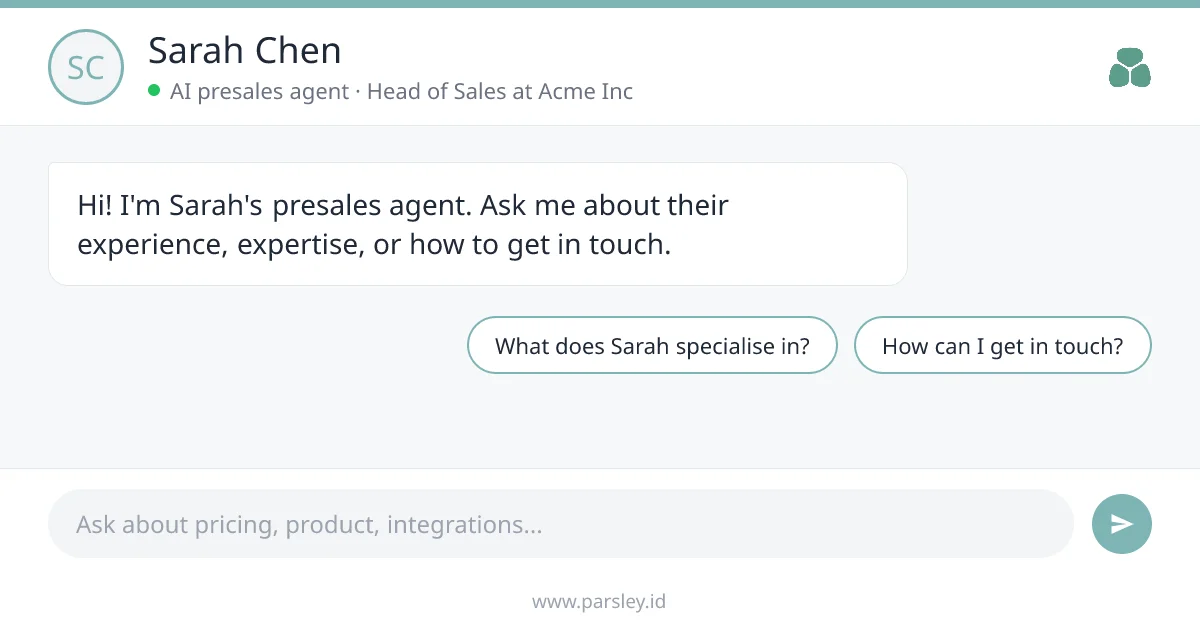
The Featured card a Parsley link renders: the agent's real welcome message and suggested questions, pulled from the page's Open Graph tags.
What sellers should put in the Featured section
Keep it to two or three cards - desktop shows 2-3 before the "Show all" fold, and the first card gets most of the attention.
1. A link that answers questions (first position)
Prospects who visit your profile are doing homework they don't want to do on a call. Give them somewhere to do it. A link to an AI presales agent trained on your sales docs lets them ask about pricing, integrations, and fit anonymously - and you capture what they asked as first-party buyer intent. This is the card to pin first: it converts profile lurkers into conversations. The five-step guide to adding an AI chatbot to your LinkedIn profile covers the whole setup - training the agent, placing the link, and routing what it hears to your CRM - there is a live demo card on the LinkedIn Featured section AI chat page, and a comparison of the chatbot options if you are choosing a tool.
2. Proof (second position)
One case study, customer story, or concrete result. Not a brochure - a specific outcome a prospect can map onto their own situation. If your company publishes a strong customer page, feature that; if you have a post that performed well with real engagement, feature the post.
3. Optional: a booking link (third position)
A meeting scheduler is fine as a third card, but think about the ask. A cold profile visitor rarely books a meeting; they will ask an anonymous question. That is why the answer surface goes first and the calendar goes last.
What to leave out: certificates, slide decks nobody downloads, and more than one company link. Every extra card dilutes the first one.
Put a presales agent in your Featured section
Your Parsley link previews as a chat card. Free to start, 10 free conversations, live in minutes.
Get started freeHow to add your link to the Featured section
- On your LinkedIn profile, click Add profile section
- Choose Recommended, then Add featured
- Click the + icon and select Add a link
- Paste your link and save - LinkedIn pulls in the preview card automatically
- Drag your most important card to the first position
If the card looks stale or has no image: LinkedIn caches link previews. Run your URL through the LinkedIn Post Inspector to force a re-scrape, then remove and re-add the Featured item.
The same preview card renders when you paste your link in a DM or InMail - one well-built page covers both surfaces. One caution from the messaging side: avoid dropping links in the very first message to someone you have never interacted with. LinkedIn is known to suppress first-touch messages with links; the Featured section carries the link passively instead, with none of that risk. If you work outbound as an SDR, the Parsley for SDRs page maps every placement in a typical cadence.
Frequently Asked Questions
Can I embed a chatbot directly inside LinkedIn?
No. LinkedIn does not allow embedded widgets or scripts anywhere on a profile - the Featured section accepts only links, posts, articles, and media files. The working approach is a link whose preview card looks like a chat and whose click lands on a live AI agent - the full setup takes about 15 minutes.
How many Featured items should I have?
Two or three. Desktop visitors see 2-3 cards before clicking "Show all", and mobile shows 1-2 with a swipe. The first position gets most of the clicks, so lead with the card you most want acted on.
Why does my Featured link show no image?
The target page is missing Open Graph tags, or LinkedIn cached an old version. Check the page with the LinkedIn Post Inspector - it shows exactly what LinkedIn scrapes and forces a refresh.
Do I need LinkedIn Premium for the Featured section?
No. The Featured section is free for every account. Only the "Visit my website" custom button requires Premium Business, Sales Navigator, or Recruiter Lite as of May 2025.
Does the Featured section affect my post reach?
No. Featured cards sit on your profile and are not subject to the feed algorithm's external-link penalty. That is precisely why they matter for sellers: the profile carries the link so your posts don't have to.
Your profile gets visited by every prospect you touch - cold email, DM, comment, or call invite. Make the visit count: create a free Parsley profile, upload your sales docs, and your Featured section card becomes a presales agent that answers questions and captures buyer intent around the clock.

