How to Capture Buyer Intent From LinkedIn Profile Visitors
Prospects check your profile before every reply and every call. Four ways to capture what those visitors want, from native tools to first-party intent.
LinkedIn's native tools cannot capture buyer intent from your profile visitors - "Who viewed your profile" tells you who looked (sometimes), never why. Capturing intent means giving visitors a way to express it: a conversational page linked from your profile, tagged links so you can attribute the traffic, and a route into your CRM. This guide covers all four methods, from what LinkedIn gives you natively to first-party conversational intent.
The stakes, per the analysts, are not subtle:
Sources: Forrester, The State of Business Buying 2024; Gartner sales AI research.
Stalled purchases are the intent problem in disguise: deals stall where a buyer's unanswered question sits. Capturing what your profile visitors want to know is how you find that question early.
Why a profile visit is an intent signal in the first place
Think about when prospects actually look at your profile: after your connection request lands, after your cold email arrives, before they accept a meeting, before the first call. A profile visit is rarely idle browsing - it is a prospect doing homework on whether you are worth a reply.
Gartner's research puts numbers on that homework phase: B2B buyers spend only about 17% of their buying journey meeting with potential suppliers, and 67% prefer a rep-free experience for at least part of their purchase. The rest is independent research - and for outbound, your LinkedIn profile is where a large share of that research happens.
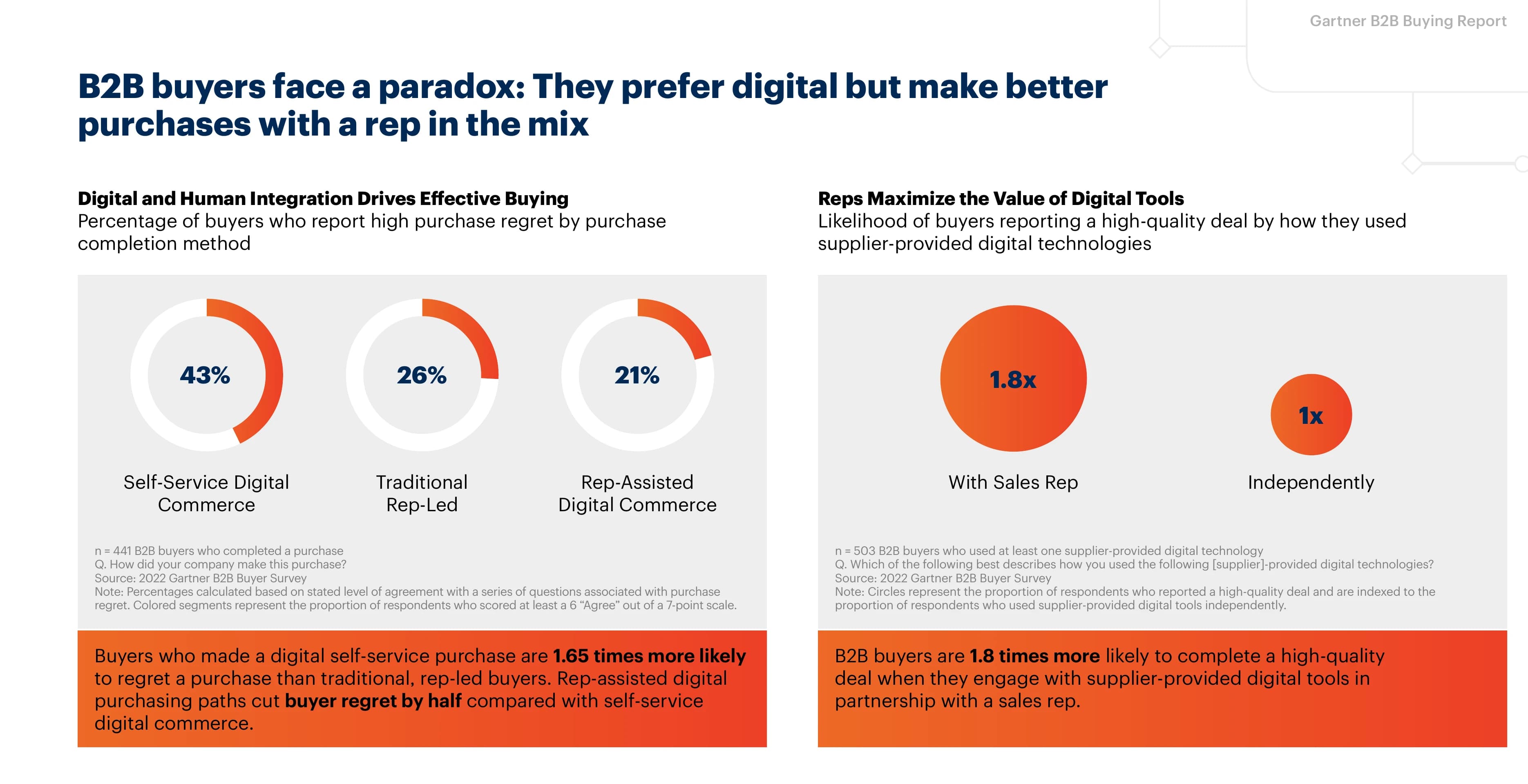
Sources: Gartner, 2026; Gartner B2B buying journey research.
The problem: almost all of that signal evaporates. The prospect scrolls, forms an impression, and leaves. Unless you have set up somewhere for the visit to go, you learn nothing. Here are the four methods, ordered from what you already have to what captures the most.
Method 1: Use LinkedIn's native visibility - and know its limits
Start with what LinkedIn gives you out of the box:
- "Who viewed your profile" shows recent viewers. On a free account you see a limited list; Premium unlocks the full viewer history. But any viewer browsing in private mode appears as "Anonymous LinkedIn Member," and semi-private viewers show only a title and company.
- Sales Navigator alerts can flag when saved leads view your profile - genuinely useful as a trigger for a well-timed follow-up.
The structural limit is that native tools stop at who. A name and a timestamp tell you someone from the account looked; they do not tell you whether the question on their mind was pricing, security, integrations, or "is this vendor too small for us." Treat native visibility as a trigger, not as intent.
Method 2: Give visitors somewhere to ask - first-party conversational intent
The only way to learn what a visitor wants is to let them tell you. That means linking your profile to a page where asking is easier than emailing you: an AI agent, trained on your own sales docs, that opens as a conversation.
This flips the anonymity problem into an advantage. Some prospects want to talk to a rep; many prefer to stay anonymous during early research - Gartner found 69% still turn to a human rep later to validate what AI tells them, but the homework phase comes first. A visitor who would never book a meeting from a cold profile will happily ask an anonymous question about pricing or fit. Those questions are first-party intent data - intent your prospect expressed directly to you, in words, on a surface you own.
Gartner's time-distribution research shows how much of the journey this covers. Meeting with suppliers is the thinnest slice of how buying groups spend their time - independent research, internal alignment, and comparison work dominate:
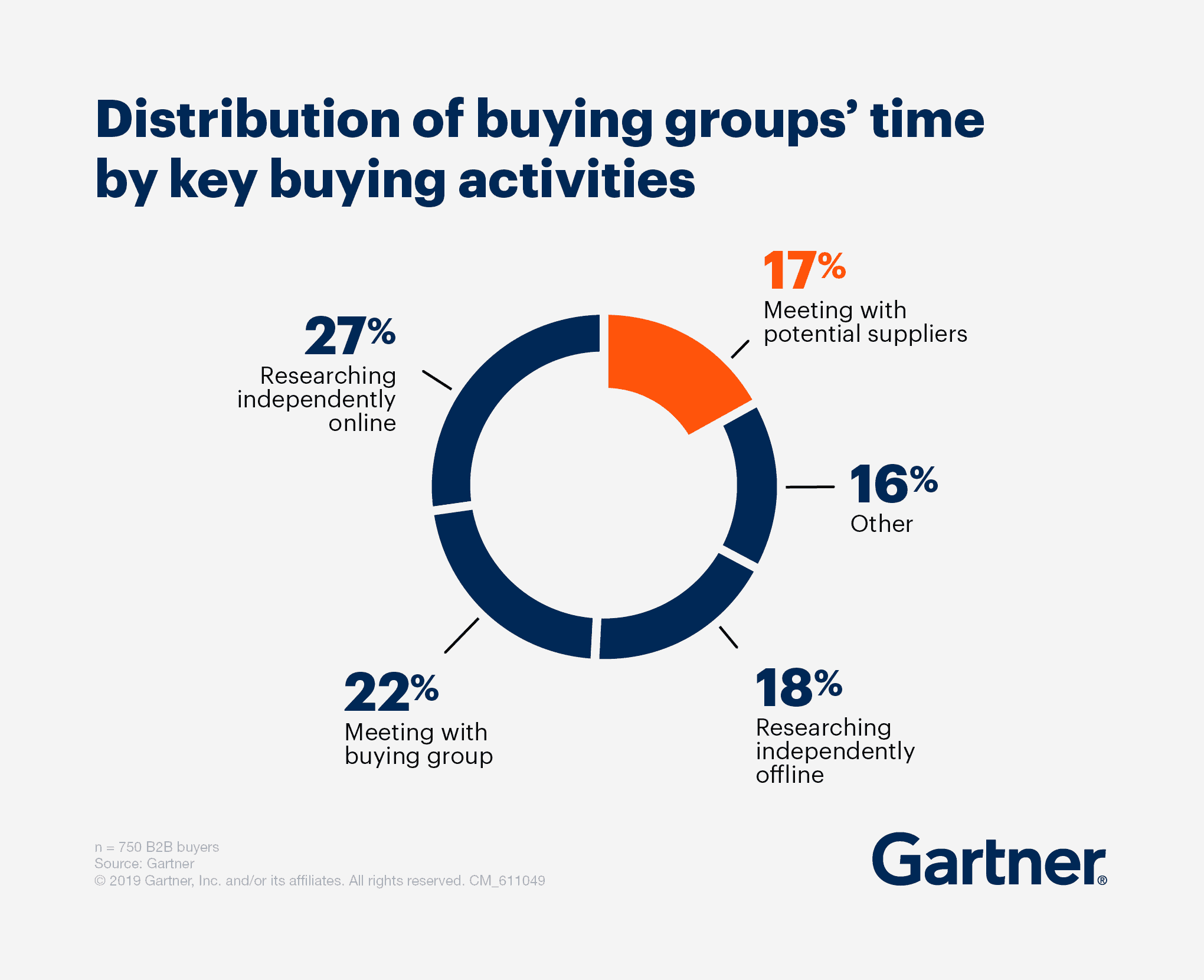
Source: Gartner (n = 750 B2B buyers)
Native LinkedIn tools only ever see the edge of that iceberg. A conversational page is the one method on this list that captures intent from the other 83% - the research phase where the deal is actually being shaped.
The setup takes about 15 minutes: create the agent, train it on pricing/FAQ/case-study docs, and link it from your Featured section so the preview renders as a chat card. The full step-by-step guide is here, and if you are choosing a tool, we compared the options in the best AI chatbots for your LinkedIn profile.
What you get per visit changes category: instead of "someone at Acme viewed your profile," you get "someone at Acme asked how your pricing scales past 50 seats and whether you integrate with HubSpot." Parsley classifies each conversation as Hot, Warm, or Cold buyer intent automatically - pricing and timeline questions read hot, early feature questions read warm.
Capture buyer intent from your LinkedIn profile
Parsley answers your profile visitors from your sales docs and scores every conversation for intent. 10 free conversations.
Get started freeMethod 3: Tag your links so profile traffic is attributable
Whatever page your profile points to, tag the links (UTM parameters like ?utm_source=linkedin&utm_medium=profile) so profile-sourced visits show up as their own segment in your analytics. Use distinct tags for the Featured section, contact-info websites, and your About text if you drop a URL there - you will learn which placement actually gets clicked.
This is also where website deanonymization tools (Warmly, RB2B, Leadfeeder, and peers) fit: they identify which companies are hitting your site, including traffic your LinkedIn profile sends. Useful for account-level coverage - but note the category difference. Reverse-IP identification tells you an account visited; it still cannot tell you what they wanted. It is inferred, account-level signal, while a conversation is declared, person-level signal. The two compose well; they are not substitutes. The broader comparison of intent sources is in our buyer intent data guide.
Method 4: Route the intent to where your pipeline lives
Captured intent that sits in a separate dashboard decays. Whatever you collect - conversations, viewer alerts, attributed visits - route it to your CRM so it lands next to the deal record:
- Conversations and their intent scores sync from Parsley to Attio, HubSpot, Folk, and others, so "what this prospect asked on my profile" is on the record before the first call.
- Sales Navigator viewer alerts become follow-up tasks.
- Attributed profile traffic feeds your account-scoring, if you run any.
The test of the whole setup: when a prospect books a call, can the rep see what that prospect asked three days earlier? If yes, the first call starts from what the buyer already told you. That is the practical payoff of scoring leads from conversation signals instead of guessing from job titles - and it is the working answer to Forrester's finding that 86% of B2B purchases stall mid-process. A deal stalls on an unanswered question; a rep who knows the question can unstick it.
First-party conversational intent vs third-party intent data
| Conversational intent (your profile) | Third-party intent data (vendors) | |
|---|---|---|
| Source | What prospects ask you directly | Scraped topic surges, reverse-IP, content consumption |
| Level | Person, per conversation | Account, aggregated |
| Signal | Declared - "does this integrate with HubSpot?" | Inferred - "Acme is researching your category" |
| Timing | The moment they visit your profile | Days to weeks lag |
| Cost | Cents per conversation | Typically five-figure annual contracts |
Third-party data answers "which accounts might be in market." Your profile visitors answer a better question: "what does this specific prospect - who I already touched - want to know before they reply?"
Common pitfalls
- Relying on "Who viewed your profile" alone. Private-mode viewers are invisible, and even named viewers carry no intent. It is a trigger list, not an intent source.
- Linking your profile to a homepage. A visitor with a question lands on a brochure and leaves. Make the conversation the landing experience.
- Demanding an email before answering. Interrogating visitors kills the conversation. Answer first - anonymous questions still tell you what your market wants to know, and some visitors identify themselves once the answers are good.
- Leaving the intent in a dashboard. If it does not reach the CRM, the rep preps the call without it and the signal was captured for nothing.
Frequently Asked Questions
Can I see everyone who viewed my LinkedIn profile?
No. Free accounts see a limited recent list, Premium sees the full history, but anyone browsing in private mode appears anonymous regardless of your plan. That is why capture strategies that depend on knowing the viewer's name have a hard ceiling.
Does LinkedIn tell me what a visitor looked at or clicked?
No. LinkedIn reports the visit (subject to the viewer's privacy settings), not behavior - no section-level analytics, no click tracking, no questions. Learning what a visitor wanted requires a surface you control, linked from the profile.
Do visitors have to identify themselves for the intent to be useful?
No. Expect the majority of profile-linked conversations to stay anonymous - that is the point, it is why prospects engage at all. Anonymous questions still reveal what your market is evaluating and which objections recur; the subset who leave an email or book a call arrive pre-qualified by their own questions.
Is this the same as buying intent data from a vendor?
No. Vendor intent data is third-party: aggregated, account-level, inferred from scraped signals. What your profile visitors ask you is first-party and declared - lower volume, far higher precision, and it costs cents instead of a contract. Most teams that use both treat vendor data as air cover and conversational intent as the trigger to act.
What does the conversational setup cost?
A Parsley profile is free to create and includes 10 free conversations; after that, conversations cost about 25 cents each in credit packs, with no subscription. The link placements on LinkedIn - Featured section and contact info - are free on every account.
Every connection request and cold email you send this quarter triggers a profile visit. Create a free Parsley profile, link it from your Featured section, and those visits start telling you what your prospects actually want - scored for intent and synced to your CRM.
The same instrumentation works across the rest of your outbound, not just the profile - see how to capture buyer intent from cold outreach for the email and InMail side.