
10 Best MCP Servers for Sales Teams in 2026
The 10 best MCP servers for agentic sales in 2026. From prospecting to scheduling, these servers let AI agents orchestrate your entire sales workflow.
The best sales teams in 2026 are not switching between 8 tabs. They are asking their AI assistant a question and getting an answer that pulls from their CRM, their prospecting tool, their call recordings, and their buyer intent data - all in one conversation.
The technology making this possible is MCP - the Model Context Protocol. It is an open standard that lets AI assistants like Claude, ChatGPT, and Cursor connect directly to external tools and data sources. Think of it as USB-C for AI: one universal plug that works with any assistant and any tool.
For sales teams, this means your AI assistant can do deal prep by pulling pipeline data from HubSpot, enrichment from ZoomInfo, call insights from Gong, and buyer intent signals from Parsley - without you touching any of those tools directly.
This guide covers the 10 MCP servers that matter most for sales teams right now, organised by where they fit in your workflow.
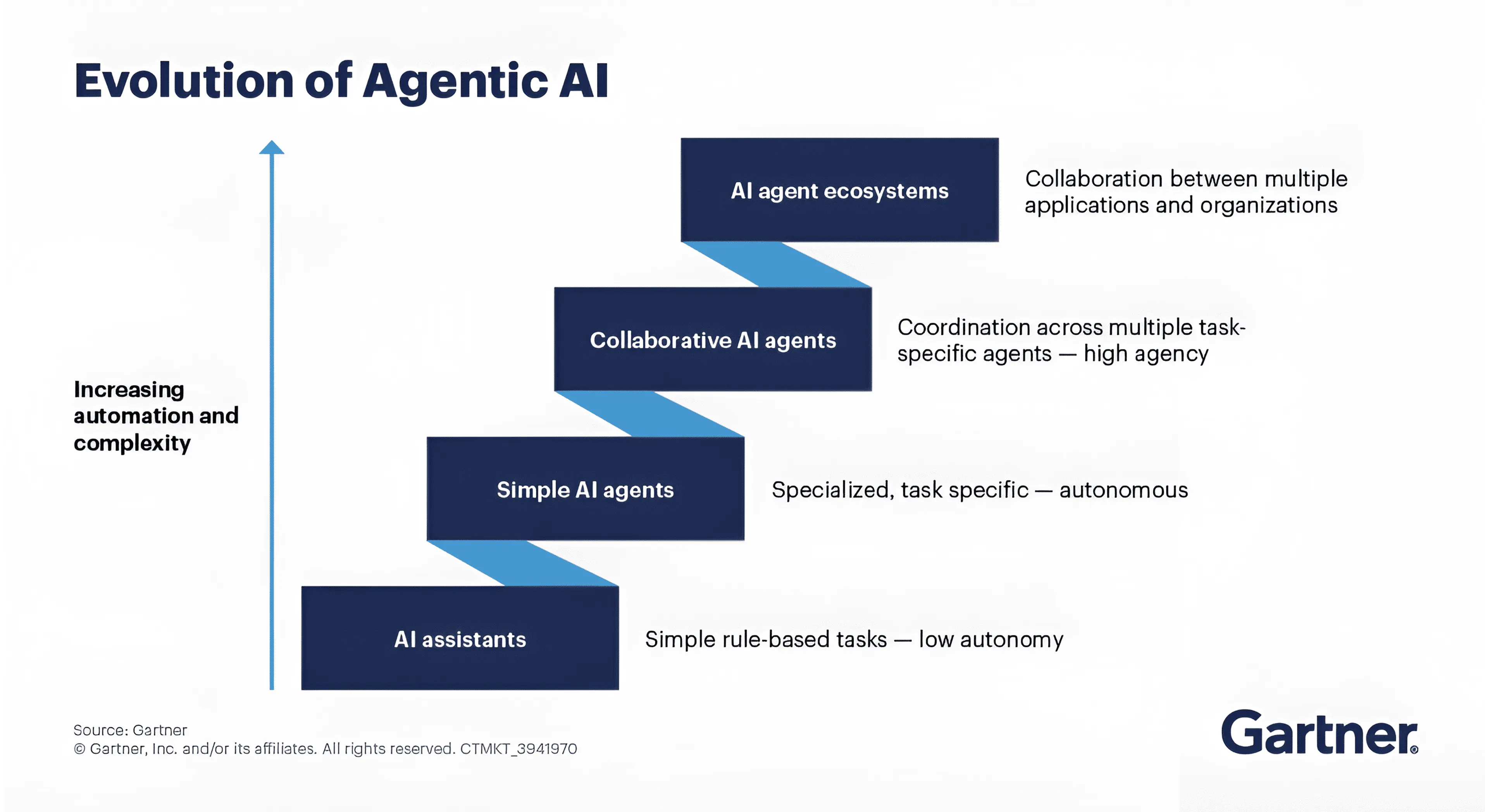
Source: Gartner. MCP servers are the connective tissue that makes the top two tiers possible - collaborative agents and agent ecosystems that coordinate across multiple applications.
How to evaluate an MCP server for sales
Not all MCP servers are created equal. Before diving into the list, here is the framework we used to evaluate each one:
| Criteria | What to look for |
|---|---|
| Official vs community | Vendor-built servers get faster updates and better support. Community servers can disappear. |
| Read vs read-write | Read-only is safer. Read-write is more powerful but needs tighter permission controls. |
| Authentication | OAuth is easier to manage at scale. API keys work well for individual users and small teams. |
| Cross-MCP composability | The real value comes from combining servers. Does this server play well with others? |
| Setup complexity | Can a non-technical sales leader install this in under 5 minutes? |
The MCP servers in this guide are all vendor-official or vendor-endorsed. We have excluded community-only projects that lack official support.
Find: Prospecting and enrichment
The first layer of any agentic sales workflow is finding and enriching prospects. These MCP servers replace the manual process of searching databases and copy-pasting contact details.
1. Apollo.io
What it does: Gives your AI assistant access to Apollo's 275M+ contact database with 34+ tools for prospecting, enrichment, and sequence management.
Who it is for: Outbound-heavy teams that want to research, enrich, and add prospects to sequences without leaving their AI assistant.
Standout feature: You can go from "find me 20 VPs of Sales at Series B fintech companies in London" to having those contacts researched, enriched, and added to an outreach sequence - entirely through conversation. Every action syncs back to Apollo as your system of record.
Setup: API key authentication. Available on all paid Apollo plans at no extra cost. Moderate complexity - 34+ tools means Claude sometimes needs guidance on which to use.
2. ZoomInfo
What it does: Six focused tools for finding and enriching accounts and contacts from ZoomInfo's database of 300M+ professional profiles and 100M+ companies.
Who it is for: Enterprise teams that need verified contact data and firmographic enrichment as part of their AI workflow.
Standout feature: Real-time enrichment inside your AI conversation. Ask "what do we know about Acme Corp?" and get headcount, revenue, tech stack, and key contacts without opening ZoomInfo's UI. The hosted MCP server means no local installation - just authenticate and go.
Setup: Uses existing ZoomInfo API credentials. Hosted MCP server at mcp.zoominfo.com - the easiest enterprise setup on this list.
Track: CRM
Your CRM is the foundation. These MCP servers let your AI assistant read (and in some cases write) your pipeline data, so every query starts with the context of where deals actually stand.
3. HubSpot
What it does: Read-only access to contacts, companies, deals, tickets, and pipeline data across your HubSpot CRM.
Who it is for: Any team on HubSpot that wants to query their CRM through conversation instead of building reports or clicking through filters.
Standout feature: Read-only by design. This is a deliberate safety choice - your AI assistant can pull any CRM data it needs for deal prep, pipeline reviews, or cross-referencing with other tools, but it cannot accidentally modify records. With 551 uses on Smithery, it is the most adopted CRM MCP server.
Setup: OAuth via HubSpot's official server. Public Beta. Straightforward setup - most teams are live in under 5 minutes.
4. Attio
What it does: Full workspace access - search, read, create, and update records across people, companies, deals, tasks, notes, and lists.
Who it is for: Modern, API-first teams that want their AI assistant to be a full CRM co-pilot - not just a read layer.
Standout feature: Read and write access with one-click OAuth setup. Unlike HubSpot's read-only approach, Attio lets your AI assistant create records, update deal stages, and add notes. This makes workflows like "log this meeting summary against the Acme deal" possible without switching tools. Parsley also offers a native Attio integration for automated buyer intent sync.
Setup: OAuth via Attio's hosted MCP server. One-click authentication - the simplest CRM setup available.
Add buyer intent to your AI sales workflow
Connect Parsley's MCP server to Claude Desktop in under 2 minutes. Cross-reference buyer signals with your CRM data automatically.
Get started freeUnderstand: Intelligence
CRM data tells you where a deal stands. Intelligence tools tell you why - what buyers said, what they asked about, and what signals they revealed. These MCP servers surface the context that makes every other tool more useful.
5. Gong
What it does: Bidirectional intelligence - your AI assistant can query Gong for deal intelligence, call summaries, and competitor mentions. Gong can also pull context from your other MCP-connected tools into its own AI features.
Who it is for: Revenue teams running Gong who want call intelligence woven into their daily AI workflow - and who want Gong's own AI to be smarter by accessing external data.
Standout feature: Two-way data flow. Most MCP servers are one-directional (you query them). Gong's MCP Gateway also feeds external context into Gong's AI Briefer and Ask Anything features. Ask Claude "what are the top objections across this quarter's lost deals?" and get an answer synthesised from actual call recordings. Then Gong's own AI uses your CRM data to enrich its coaching suggestions.
Setup: Available via Gong's MCP Gateway. Requires the Amplify package. Enterprise-focused setup.
6. Parsley
What it does: Query buyer intent signals, MEDDIC qualifications, lead scores, and conversation intelligence from visitors who interact with your Parsley AI chatbot - before they ever speak to a rep.
Who it is for: Sales teams who want to know what buyers are thinking before the first call. If you use Parsley's embedded presales agent, this MCP server makes that intelligence queryable from Claude, ChatGPT, or Cursor.
Standout feature: Cross-MCP orchestration. Parsley is designed to work alongside your CRM's MCP server. Ask "which hot leads from this week have no follow-up in HubSpot?" and Claude calls both Parsley and HubSpot's MCP servers, cross-references the data, and returns the gaps. The morning briefing prompt makes this a daily habit. Eight tools and five pre-built workflow prompts cover everything from deal prep to content gap analysis.
Setup: API key from your Parsley dashboard. Available on Smithery and as a local install via npx @tryparsley/mcp-server. Analytics tool runs on every account; the other 7 tools and 5 prompts draw from your conversation balance (10 free starter conversations).
Engage: Outreach
Once you have found prospects, tracked them in your CRM, and understood their intent - you need to reach them. These MCP servers bring outreach execution into your AI workflow.
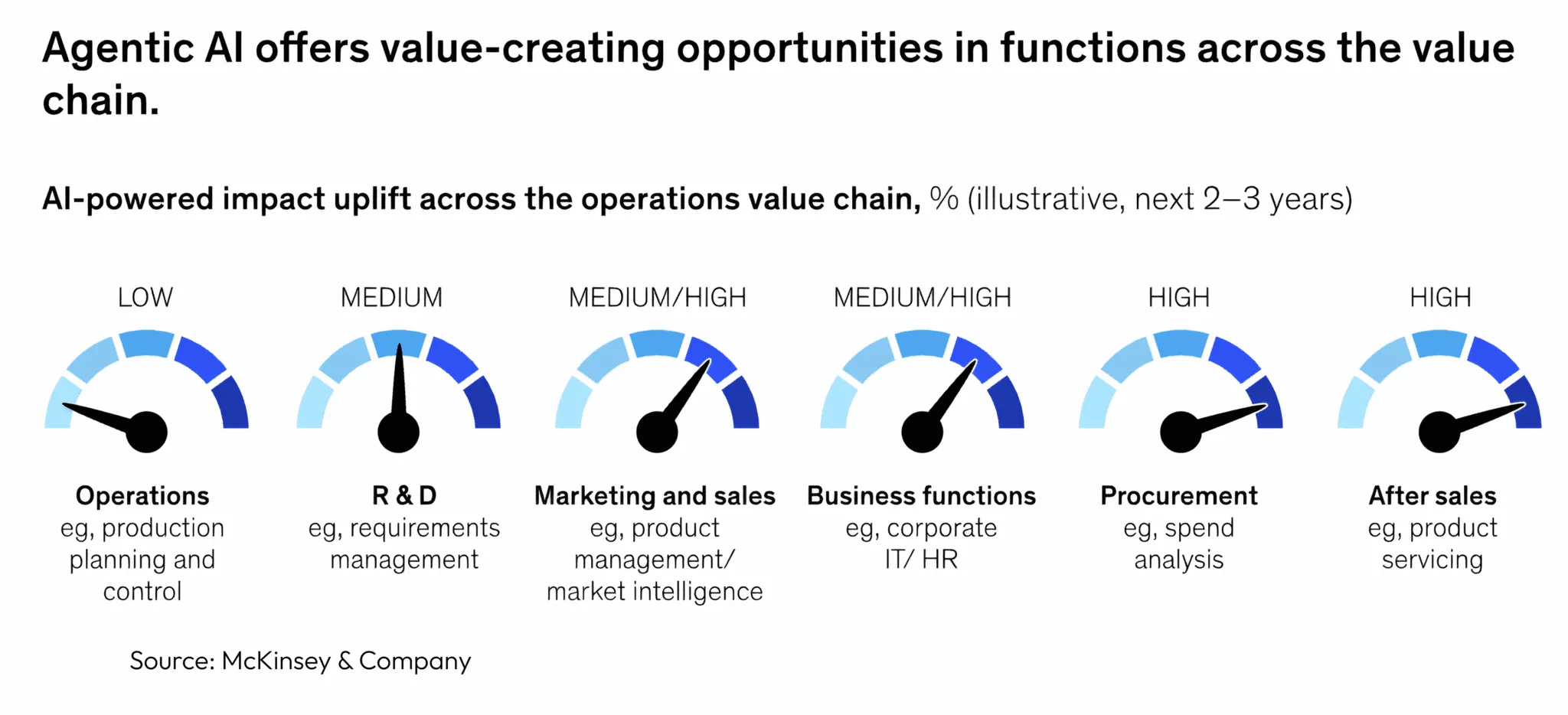
Source: McKinsey & Company. Marketing and sales is one of the highest-impact functions for agentic AI over the next 2-3 years.
7. Outreach
What it does: Manage sequences, prospects, accounts, calls, tasks, and enrolment through conversation. Full sales engagement platform access from your AI assistant.
Who it is for: Enterprise sales teams on Outreach who want to manage engagement workflows without switching to the Outreach UI for every action.
Standout feature: Safety by design. Sequences created through the MCP server start in draft mode - a human must activate them. Prospect enrolment requires explicit confirmation. This means your AI assistant can prepare and stage outreach workflows, but a rep always approves before anything goes live. Smart guardrail for enterprise teams.
Setup: Requires the Outreach Amplify add-on. OAuth authentication. Moderate setup complexity.
8. HeyReach
What it does: LinkedIn outreach at scale - create campaigns, manage lead lists, and push prospects through LinkedIn sequences with multi-account rotation for safety.
Who it is for: Teams running LinkedIn-first outbound who want their AI assistant to manage campaigns alongside their CRM and prospecting tools.
Standout feature: The only LinkedIn automation platform with an MCP server. This means you can build workflows like "find 50 prospects on Apollo, check which ones have shown buyer intent on Parsley, and add the hot ones to a HeyReach LinkedIn sequence" - all through a single AI conversation. Multi-account rotation keeps your LinkedIn accounts safe at volume.
Setup: API key authentication via HeyReach's MCP endpoint. Straightforward setup.
9. Instantly
What it does: Cold email campaign management - create campaigns, manage accounts, handle leads, monitor deliverability, and pull analytics.
Who it is for: Cold email teams and agencies who want their AI assistant to monitor campaign health, flag deliverability issues, and manage outreach across multiple workspaces.
Standout feature: Deliverability diagnostics through conversation. Ask "which campaigns have bounce rates above 3%?" or "are any sending domains at risk?" and get actionable answers without digging through dashboards. For agencies managing multiple client workspaces, this is a force multiplier - one AI assistant monitoring everything.
Setup: API key authentication. Available on Smithery. Free with any Instantly subscription. Five-minute setup.
Close: Scheduling
The final step in most sales workflows is getting time on the calendar. This MCP server makes that frictionless.
10. Calendly
What it does: Book and cancel meetings, update availability, find open slots, and create one-time scheduling links - all through natural language.
Who it is for: Any sales team that uses Calendly and wants meeting scheduling integrated into their AI workflow.
Standout feature: Natural language scheduling that understands context. Say "I need to find 30 minutes with the Acme team next week - check my availability and send them a link" and Calendly's MCP server handles the rest. Combined with a CRM MCP, your AI assistant can check who you are meeting, prep the deal context from your CRM, and suggest an agenda - before you join the call.
Setup: OAuth via Calendly's hosted MCP server at mcp.calendly.com. No self-hosting required. One of the easiest setups on this list.
The full stack: how these MCP servers compose
The individual tools are useful. The composition is transformative.
Here is what becomes possible when you connect three or more MCP servers in a single AI session:
Morning briefing (Parsley + HubSpot + Calendly): "Give me today's briefing - hot leads from Parsley, any stale deals in HubSpot, and who I am meeting today."
Outbound pipeline (Apollo + HeyReach + Attio): "Find 30 Series B fintech CTOs in the UK, add them to a HeyReach LinkedIn sequence, and create a list in Attio to track them."
Deal prep (Gong + Parsley + HubSpot): "Prep me for my call with Sarah at Acme - pull her Gong call history, any Parsley conversation signals, and the current deal stage from HubSpot."
Pipeline hygiene (HubSpot + Parsley + Instantly): "Which deals in my pipeline have gone quiet? Cross-reference HubSpot activity with Parsley intent signals and flag anyone who showed buying intent but has no recent follow-up."
This is what agentic sales looks like in practice. Your AI assistant is not replacing your tools - it is orchestrating them.
Comparison table
| # | MCP Server | Category | Official | Auth | Read/Write | Best For |
|---|---|---|---|---|---|---|
| 1 | Apollo.io | Prospecting | Yes | API key | Both | Outbound teams |
| 2 | ZoomInfo | Enrichment | Yes | API key | Read | Enterprise data needs |
| 3 | HubSpot | CRM | Yes | OAuth | Read | HubSpot-native teams |
| 4 | Attio | CRM | Yes | OAuth | Both | API-first teams |
| 5 | Gong | Intelligence | Yes | OAuth | Both (bidirectional) | Revenue teams with call data |
| 6 | Parsley | Buyer intent | Yes | API key | Read | Intent-driven sales |
| 7 | Outreach | Engagement | Yes | OAuth | Both (draft mode) | Enterprise sequences |
| 8 | HeyReach | Yes | API key | Both | LinkedIn-first outbound | |
| 9 | Instantly | Cold email | Yes | API key | Both | Email teams and agencies |
| 10 | Calendly | Scheduling | Yes | OAuth | Both | Meeting-heavy roles |
How to get started
You do not need to set up all 10. Start with the combination that matches your workflow.
Start with HubSpot or Attio. This is the foundation - most queries start with pipeline data. Run it for a week to build the habit of querying through conversation.
Connect Parsley for buyer intent signals or Gong for call intelligence. This gives your AI assistant the 'why' behind your deals - not just the 'where'.
Add Apollo for enrichment, HeyReach for LinkedIn, or Instantly for email. Now your AI assistant can find, understand, and reach prospects in a single workflow.
Build morning briefings and deal prep routines that pull from 3-4 sources. This is where the compounding value kicks in - each new tool makes every other tool more useful.
Frequently Asked Questions
What is MCP and why does it matter for sales?
MCP (Model Context Protocol) is an open standard developed by Anthropic that lets AI assistants connect to external tools and data sources. For sales teams, it means your AI assistant can query your CRM, prospecting tools, call recordings, and buyer intent data through natural language - instead of you switching between 8 browser tabs. Think of it as the protocol that turns your disconnected sales stack into a unified, conversational interface.
Do I need Claude Desktop to use these MCP servers?
No. MCP is supported by Claude Desktop, ChatGPT, Cursor, Windsurf, and a growing list of AI assistants. Most servers on this list work across any MCP-compatible client. Check each vendor's docs for the latest compatibility list.
Are MCP servers secure for sales data?
Yes, with standard precautions. Most MCP servers on this list run locally on your machine or use hosted OAuth flows - your data travels directly between your machine and the service. Use API keys with minimum required scopes, rotate credentials regularly, and review what permissions each server requests before connecting.
How much do these MCP servers cost?
Most are included with existing subscriptions at no extra cost (Apollo, HubSpot, Attio, Instantly, Calendly). Some require premium tiers or add-ons (Gong Amplify, Outreach Amplify, ZoomInfo API access). Parsley is pay-as-you-go at 25¢ per conversation, with 10 free starter conversations at signup.
Can non-technical sales reps set these up?
Most of them, yes. Calendly, Attio, and HubSpot use one-click OAuth - no config files needed. Apollo and Parsley use API keys with a simple JSON config. The harder setups are Gong and Outreach, which require enterprise add-ons and admin involvement.
Ready to build your agentic sales stack? Start with your CRM, add Parsley's buyer intent MCP for the intelligence layer, and see what your AI assistant can do when it has access to your full sales workflow. Create a free account to get started.

