
Follow-Up Email Templates Based on What Prospects Asked
6 follow-up email templates triggered by buyer intent signals. Reference what prospects actually care about and stop being ignored.
The best follow-up email you can send is one that references what the prospect actually asked about. Not a generic "great chatting" message. Not a templated nurture sequence. A specific, targeted response that proves you were listening - or better, that your tools were listening for you.
Most sales reps send the same follow-up to every prospect regardless of what was discussed. The result: low reply rates, wasted pipeline, and prospects who feel like a number. The fix is not writing better copy - it is using better signals. When you know what a prospect asked about before you write the email, personalization stops being a creative exercise and becomes a data problem.
These six templates are each keyed to a specific buyer intent signal that Parsley detects from prospect conversations. Match the signal to the template, customize the specifics, and send.
Sources: McKinsey - The Value of Personalization, Harvard Business Review - Lead Response Management
Why Generic Follow-Ups Fail
Every rep knows they should follow up. The problem is not effort - it is information. When you do not know what the prospect cares about, you default to generic messaging.
The Generic Follow-Up Trap
Here is what most follow-up sequences look like:
Email 1: "Great connecting! Here is a link to our website." Email 2: "Just checking in - did you get a chance to look at our solution?" Email 3: "I wanted to share a case study that might be relevant." Email 4: "Are you still interested in learning more?"
None of these reference what the prospect actually discussed. They could be sent to anyone, about anything. The prospect knows it - and ignores them.
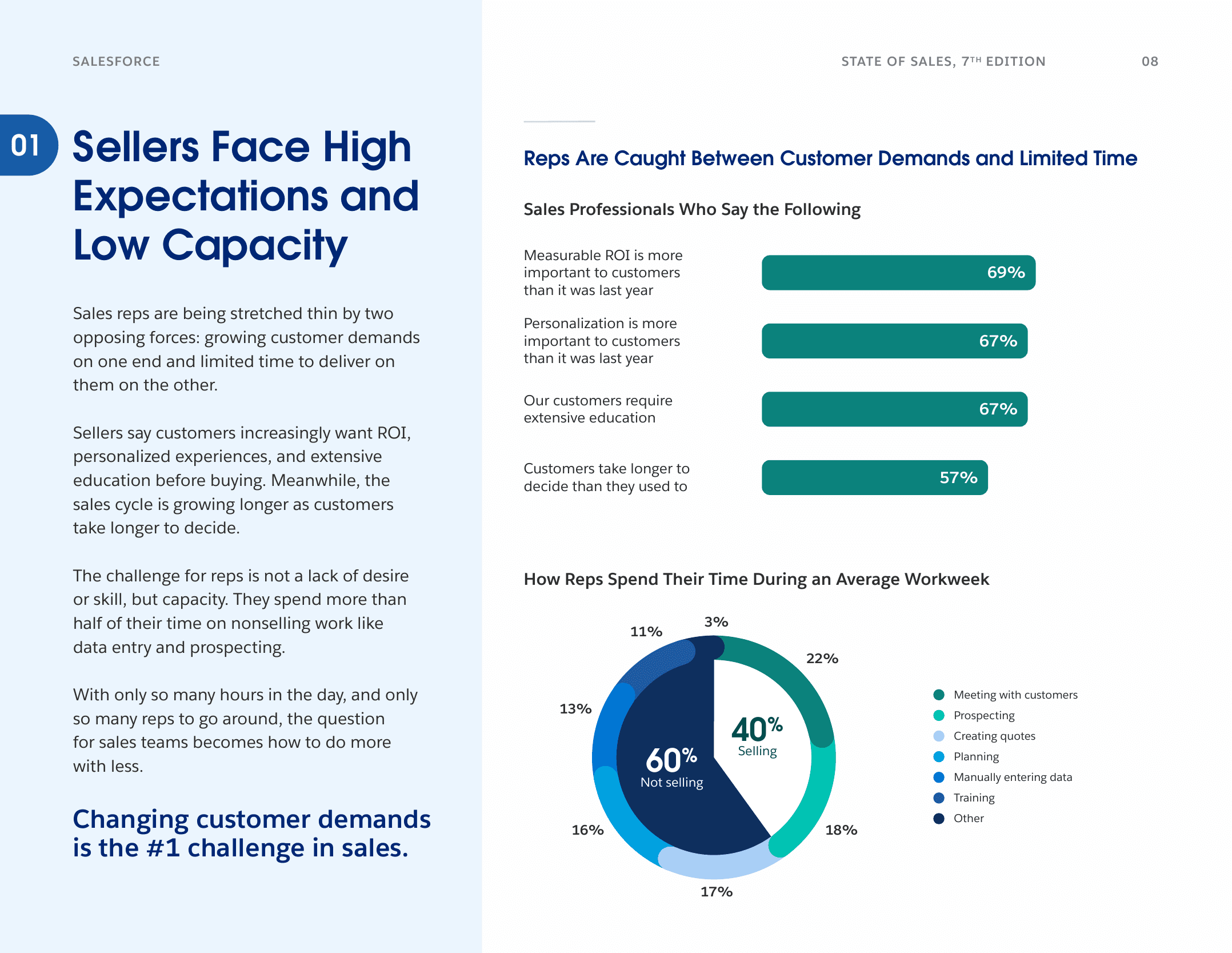
Source: Salesforce State of Sales, 7th Edition, 2026. 4,050 sales professionals surveyed.
What Personalized Follow-Ups Look Like
| Generic approach | Signal-based approach |
|---|---|
| "Here is a case study" | "You asked about ROI for teams of 30+ - here is how Acme saw 3x pipeline velocity" |
| "Did you see our pricing?" | "You mentioned budget approval in Q2 - here is a breakdown for your team size" |
| "Let me know if you have questions" | "You asked about HubSpot integration - here is exactly how the data flows" |
The difference is not copywriting skill. It is having the signal before you write.
The 6 Intent Signals That Should Trigger Your Follow-Up
Parsley's AI chatbot detects MEDDIC qualification signals passively from prospect conversations. Each signal tells you something specific about where the prospect is in their buying journey - and what your follow-up should address.
| Signal | What It Means | Follow-Up Priority |
|---|---|---|
| Pricing questions | Active cost evaluation, budget awareness | Immediate - within 1 hour |
| Pain expressed | Problem is real and top-of-mind | Same day |
| Decision process revealed | Prospect shared how they buy | Same day |
| Champion behaviour | This person is driving the evaluation | Immediate |
| Metrics mentioned | Prospect has specific KPIs to hit | Within 24 hours |
| Timeline urgency | Deadline or trigger event coming | Immediate |
Template 1: Pricing Signal Detected
When to use: The prospect asked your chatbot about pricing, packaging, or cost for a specific team size.
Why it works: Pricing questions are the strongest buying signal. This person is not browsing - they are evaluating. Your follow-up confirms you have what they need at the right price point.
Subject: Pricing for [team size] on [their CRM]
Hi [Name],
I saw you were looking at pricing for a team of [X]. Here is a quick breakdown of what that looks like:
- [Plan name] at [price] per user/month covers [key features they asked about]
- For [X] users, that comes to [total] per month
- [Relevant discount or annual pricing if applicable]
I have also attached a one-pager that covers what is included at each tier.
If you want to walk through this together or have questions about what is covered, I am happy to set up 15 minutes this week.
[Your name]
Template 2: Pain Point Expressed
When to use: The prospect described a specific problem - reps going into calls blind, leads falling through the cracks, no visibility into what prospects care about.
Why it works: When someone tells you their pain, the worst response is to ignore it. This template mirrors their exact problem back and shows how you solve it.
Subject: Re: [their specific pain point]
Hi [Name],
You mentioned that [specific pain from conversation - e.g. "your reps spend 20 minutes researching each prospect before calls and still go in without real context"]. That is one of the most common problems we hear from [their role type] teams.
Here is how [2-3 other companies in their space] solved it:
- [Company A] cut pre-call research from 20 minutes to under 2 by using conversation signals from their profiles
- [Company B] went from 0% MEDDIC qualification to 65% within 6 weeks - without adding discovery calls
I can send over a more detailed breakdown of the workflow if it is useful. Or if you would rather see it live, happy to walk through a 15-minute demo.
[Your name]
Template 3: Decision Process Revealed
When to use: The prospect shared details about how they evaluate vendors - who is involved, what the timeline looks like, what criteria matter.
Why it works: Decision process signals are gold. This template shows you understand their internal dynamics and positions you to support their buying process rather than fight it.
Subject: Supporting your evaluation process
Hi [Name],
Thanks for sharing how your team is approaching this. Based on what you described - [mirror their process, e.g. "a three-vendor evaluation with final sign-off from your VP of Sales by end of Q2"] - I want to make sure you have everything you need to make the case internally.
I have put together:
- A one-page summary of how Parsley compares on your stated criteria ([list their criteria])
- ROI projections based on a team of [their size] with [their CRM]
- A security and compliance overview if your IT team needs to review
Would it help to set up a brief call with [the stakeholder they mentioned] so they can ask questions directly? Happy to join or let you run it - whatever works for your process.
[Your name]
Know what prospects asked before you write the follow-up
Parsley detects buyer intent signals from prospect conversations and syncs them to your CRM. Every follow-up starts with context, not guesswork.
Get started freeTemplate 4: Champion Behaviour Identified
When to use: The prospect showed champion signals - sharing the profile with colleagues, asking about team pricing, requesting materials for internal stakeholders, or returning multiple times.
Why it works: Champions sell on your behalf internally. This template arms them with ammunition and makes their job easier.
Subject: Materials for your team review
Hi [Name],
It looks like you have been sharing Parsley with your team - that is great. I want to make sure you have everything you need to bring this forward internally.
Here is a quick kit:
- Executive summary - one page, covers the problem, solution, and expected ROI for [their team size]
- Integration overview - how Parsley connects to [their CRM] and what the data flow looks like
- Competitive comparison - how we stack up on the criteria that matter to your team
If there is anything specific your [stakeholder title] would want to see, let me know and I will put it together. I have seen teams like yours get approval faster when the business case is pre-built.
[Your name]
Template 5: Metrics and KPIs Mentioned
When to use: The prospect mentioned specific goals or metrics - pipeline velocity, conversion rates, lead response time, qualification rates.
Why it works: When prospects share their KPIs, they are telling you exactly how they will measure success. Your follow-up should speak directly to those numbers.
Subject: Hitting [their specific metric]
Hi [Name],
You mentioned wanting to [their specific goal - e.g. "improve lead response time" or "increase pipeline velocity by 25%"]. Here is what that looks like in practice for teams using Parsley:
| Metric | Before Parsley | After Parsley |
|---|---|---|
| Lead response time | 24-48 hours | Under 1 hour (auto-routed) |
| MEDDIC qualification rate | 15% of opportunities | 65%+ of chatbot leads |
| Pre-call research time | 15-20 min per prospect | 2 min (conversation summary) |
The biggest driver is that leads arrive pre-qualified with intent signals - reps do not waste time on unqualified conversations.
Would it be helpful to model this against your current numbers? I can build a quick projection if you share your current [metric] baseline.
[Your name]
Template 6: Timeline or Urgency Signal
When to use: The prospect mentioned a deadline, trigger event, or urgency - "we need this by Q2", "our contract with [competitor] expires in June", "we are hiring 10 new reps next month."
Why it works: Timeline signals demand speed. This template acknowledges the urgency and proposes a fast path to value.
Subject: Getting you live before [their deadline]
Hi [Name],
You mentioned [their timeline trigger - e.g. "needing a solution in place before your new reps start in May"]. Here is what the path to live looks like:
Week 1: Connect [their CRM], upload your sales docs, configure chatbot Week 2: Enable profiles for your team, add to outreach sequences Week 3: First conversation signals flowing, leads scoring automatically
Most teams are fully operational within 10 business days. Given your [deadline], we have plenty of runway if we kick off in the next week or two.
Want to lock in a 30-minute setup call this week? I will walk your team through the whole process.
[Your name]
How to Build a Signal-Based Follow-Up Workflow
For Individual Reps
-
Check your CRM before writing. When Parsley syncs a new lead, the contact record includes the conversation summary, detected MEDDIC signals, and lead quality score (Hot/Warm/Cold). Read the signals before you open your email client.
-
Match the signal to the template. Use the primary signal detected. If multiple signals fired, lead with the highest-priority one (pricing and timeline beat metrics and pain).
-
Customize in under 5 minutes. The templates above are starting points. Replace the bracketed text with specifics from the conversation summary. The prospect's own words should appear in your email.
-
Send within the priority window. Hot signals (pricing, champion, timeline) need same-hour follow-up. Warm signals (pain, metrics, decision process) need same-day. Speed matters - a 5-minute response makes you 21x more likely to qualify the lead.
For Sales Leaders
-
Build the templates into your CRM. Create saved templates in HubSpot or Salesforce, one per signal type. Reps select the template based on the MEDDIC signal detected - no guesswork.
-
Set up signal-based notifications. Configure your CRM to alert the assigned rep immediately when a Hot lead comes in with specific signals. Do not let high-intent leads sit in a queue.
-
Track signal-to-reply rates. Measure which signal types generate the highest reply rates. Most teams find that pricing and timeline signals convert at 3-5x the rate of generic outreach.
-
Review conversation summaries weekly. The patterns in prospect questions reveal what your market cares about. If 40% of prospects ask about HubSpot integration, that tells you something about your ICP.
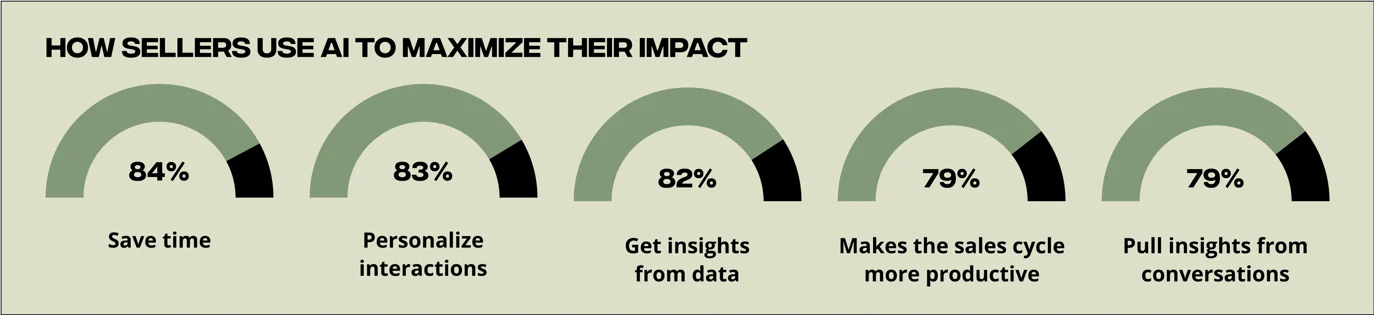
Source: HubSpot 2025 Sales Trends Report. 1,000+ sales professionals surveyed.
Frequently Asked Questions
How is this different from regular email personalization?
Regular personalization uses static data - name, company, job title, industry. Signal-based follow-ups use dynamic intent data - what the prospect actually asked about in a real conversation. The difference: static data tells you who someone is. Intent signals tell you what they want right now. A follow-up that references their specific question converts at a fundamentally higher rate than one that references their job title.
What if a prospect triggers multiple signals?
Lead with the highest-priority signal. Pricing and timeline signals indicate the most urgency and should anchor your follow-up. You can reference secondary signals in the body - for example, leading with their pricing question and mentioning the team size (metrics) they shared. Do not try to address all signals in one email; save lower-priority signals for subsequent touches.
Do I need Parsley to use these templates?
The templates work with any source of conversation intelligence. If you have call recordings from Gong or Chorus, you can manually identify the same signals. The difference with Parsley is that signals are detected automatically and synced to your CRM before the rep writes a single word - turning a 20-minute review into a 2-minute glance at the contact record. Learn more about how conversation-based lead scoring works.
What reply rates should I expect?
Teams using signal-based follow-ups typically see 25-40% reply rates on first touch, compared to 5-15% for generic sequences. The lift comes from relevance - when prospects see their own question reflected back, they know the follow-up was written for them, not mass-sent.
Stop Guessing What to Write
The hardest part of a follow-up email is not writing it - it is knowing what to say. When you have the prospect's actual questions, concerns, and buying signals in front of you, the email writes itself.
Parsley captures what prospects ask, detects MEDDIC qualification signals, and syncs everything to your CRM - so every follow-up starts with context instead of guesswork. See how the presales agent works across every email you send - signature, cold email, follow-up, and recap.
- Intent signals detected automatically - know what prospects care about before you write
- MEDDIC qualification from conversation - no manual discovery required
- CRM sync to HubSpot, Salesforce, or Attio - signals arrive in the contact record
- Free to start - create your profile in 2 minutes
Create your free profile | See pricing
Related Articles:

