
LinkedIn Profile Optimization: The Complete Checklist for Sales Professionals
Optimize every section of your LinkedIn profile for search, credibility, and conversions. Includes a checklist, examples, and free tools to speed up the process.
Your LinkedIn profile is the most-viewed page in your sales toolkit. Prospects check it before replying to cold emails. Buyers review it before signing contracts. Recruiters scan it before reaching out. Yet most sales professionals spend hours perfecting their pitch deck and ignore the one page that shapes every first impression.
LinkedIn profile optimization is not about vanity metrics - it is about making sure the right people find you, trust you, and want to talk to you. Not sure where you stand? Audit your profile in 30 seconds with our free analyzer, then use this guide to fix what it flags.
Why LinkedIn Profile Optimization Matters for Sales
LinkedIn is where B2B deals start. Before a prospect replies to your email, accepts your connection request, or joins your call, they check your profile. What they find determines whether they engage or ignore you.
Gartner's B2B Buying Report quantifies the paradox. Buyers prefer digital self-service - but they make better purchases when a sales rep is in the mix. The data shows that rep-assisted digital commerce cuts purchase regret by half compared to pure self-service, and buyers are 1.8x more likely to complete a high-quality deal when they use digital tools alongside a rep.
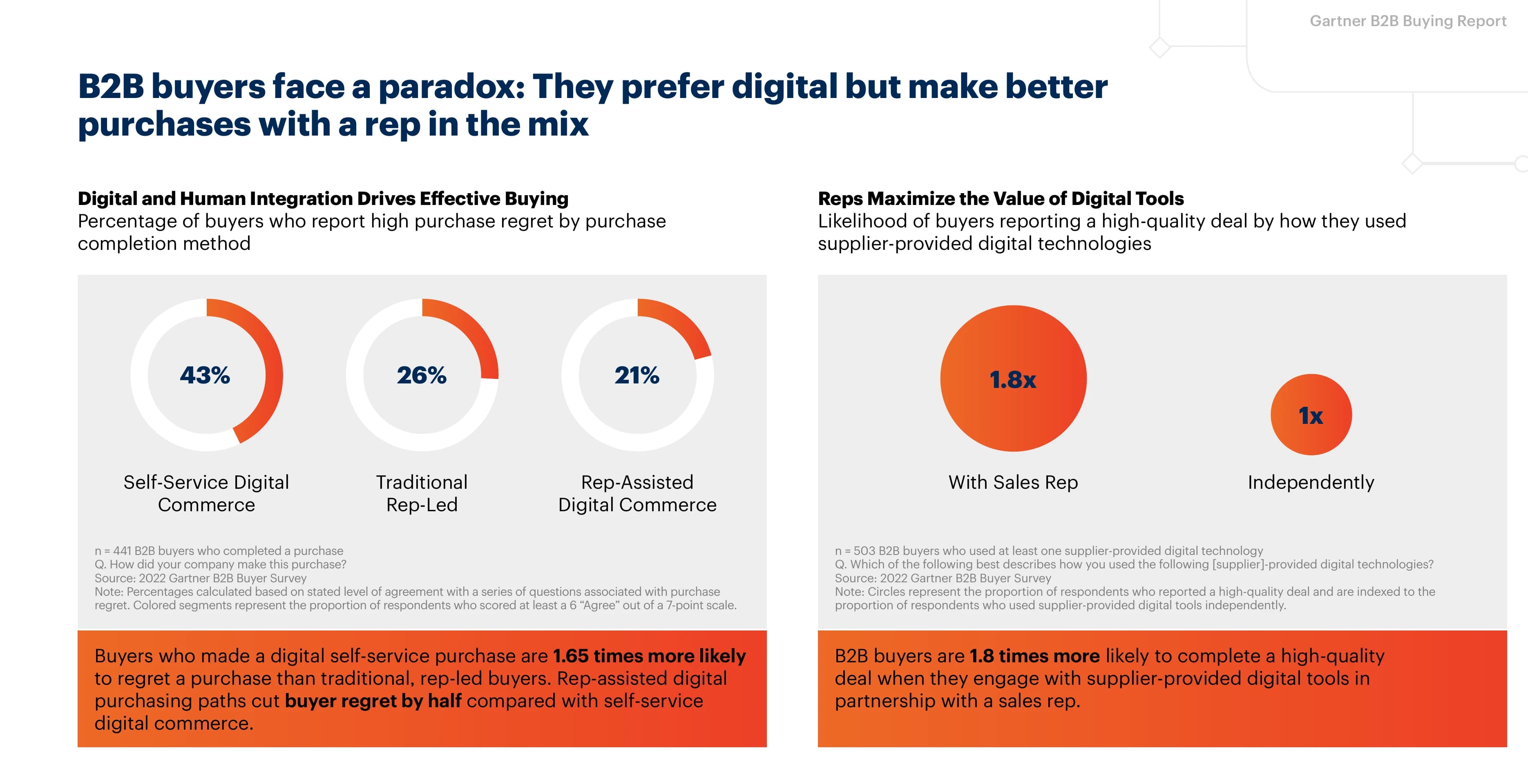
Source: Gartner B2B Buying Report, 2022 Gartner B2B Buyer Survey (n=441)
The takeaway for sales professionals: your digital presence is the first half of that equation. Your LinkedIn profile is the supplier-provided digital tool that prospects engage with before they ever talk to you. When that profile frames value clearly, the human conversation that follows is 1.8x more likely to close well.
An optimized profile does three things:
- Gets found - LinkedIn search matches your headline, About section, and experience against search queries. The right keywords put you in front of the right people.
- Builds trust - Prospects decide in seconds whether you are credible. A complete, specific, outcome-focused profile signals competence.
- Drives action - A strong profile makes it easy for prospects to say yes to a meeting, connection, or reply.
Start With an Audit
Before changing anything, score where you are now. The LinkedIn Profile Analyzer evaluates five sections of your profile - headline, about, experience, keywords, and overall completeness - and gives you a score out of 100 with specific feedback on each.
This matters because most people overestimate their profile. They think a job title headline and two-line About section is "good enough." The analyzer shows you exactly where you are losing prospects and what to fix first.
Run the audit, note your weakest sections, then work through the guide below in order of impact.
Optimize Your Headline
Your headline is the single highest-leverage line on your profile. It appears in search results, connection requests, comments, messages, and post reactions - everywhere your name shows up. LinkedIn gives you 220 characters. Most people waste them on a job title alone.
A strong headline follows a simple formula: who you are + who you help + how you help them.
[Role] | Helping [audience] [achieve outcome] | [Proof point or keyword]
Examples:
- "Enterprise AE at Acme | Helping SaaS CFOs cut procurement costs by 30%"
- "SDR | I book 15+ qualified meetings/month for B2B sales teams"
- "VP Sales | Building pipeline through conversation intelligence | Ex-Gong"
Quick fixes for your headline
- Replace your default job title - "Account Executive at Company" tells prospects nothing about the value you bring
- Add your target audience - "Helping mid-market SaaS teams" is instantly more relevant than "Helping companies grow"
- Include a metric or proof point - Numbers build credibility: "$4.2M closed in 2025", "200+ deals", "Top 1%"
- Use keywords your prospects search for - If your buyers search "revenue intelligence," put it in your headline
Need ideas fast? The LinkedIn Headline Generator creates 5 variations based on your role, industry, and preferred tone. For a deeper dive on formulas, examples by role, and mistakes to avoid, read the full guide on how to write a LinkedIn headline.
What the research says about profile optimization
LinkedIn's own data shows that small changes compound into significantly more visibility and inbound interest:
| What you optimize | Impact |
|---|---|
| Complete profile (all sections filled) | 21x more profile views, 36x more messages |
| Professional profile photo | 7x more likely to be found in search |
| Optimized headline | 30% more profile views |
| 5+ relevant skills listed | 17x more profile views |
Sources: LinkedIn, LinkedIn Pulse
These are not marginal gains. A fully optimized profile generates an order of magnitude more visibility than a default one - and that visibility compounds every time you post, comment, or send a connection request.
Write an About Section That Converts
Your About section (the "Summary") is where prospects decide whether to reply to your message or accept your meeting request. You get 2,600 characters - enough for a compelling story, but short enough that every line needs to earn its place.
The best About sections follow the AIDA framework:
- Attention - Open with a question or bold statement that speaks to your prospect's pain. "Most sales teams lose 40% of their pipeline to deals that were never qualified."
- Interest - Explain what you do and who you do it for. Be specific about industry, company size, and use case.
- Desire - Share outcomes and proof. Metrics, client results, recognizable logos, awards.
- Action - End with a clear next step. "Message me if..." or "Book a call at..."
Common About section mistakes
- Writing in the third person - "Peter is a sales professional who..." feels like a Wikipedia page. Write in first person.
- Being too short - Two lines tells prospects you did not care enough to fill it out. Aim for 3-5 paragraphs.
- No call to action - If a prospect reads your About and wants to talk, make it easy. Tell them what to do next.
- Keyword-stuffing - LinkedIn's search uses your About section for matching. Include relevant keywords naturally, but write for humans first.
The LinkedIn Summary Generator creates a polished About section using proven frameworks and three tones. For detailed guidance, see the full guide on how to write a LinkedIn summary.
Make Your Experience Section Work Harder
Most people copy their resume into LinkedIn's experience section. That is a missed opportunity. Your experience should tell a story of outcomes, not a list of duties.
Before: "Managed a portfolio of 50+ enterprise accounts"
After: "Grew a portfolio of 50+ enterprise accounts to $12M ARR, with 95% net retention and 3 expansion deals averaging $180K each"
For each role, apply this structure:
- One-line summary of the role and scope
- 2-3 bullet points with quantified achievements (revenue generated, deals closed, efficiency gains)
- Keywords that match what your prospects and recruiters search for
The experience section is also where LinkedIn pulls data for its "Skills" suggestions and search matching. If you want to appear in searches for "SaaS sales" or "revenue operations," those terms need to appear in your experience descriptions.
Social selling performance: what the data shows
The gap between sales professionals who invest in their LinkedIn presence and those who don't is well-documented across multiple research firms:
| Metric | Finding | Source |
|---|---|---|
| Quota attainment | Social sellers are 51% more likely to hit quota | |
| Pipeline generation | 45% more opportunities per quarter with high SSI scores | |
| Peer performance | 78% of social sellers outsell peers not using social media | |
| Revenue contribution | Social selling generates 50% of revenue in 14 major industries | LinkedIn Sales Blog |
| B2B leads from social | 80% of B2B social media leads originate on LinkedIn | LinkedIn Business |
| Formal training | 93% of sales executives have received no formal social selling training | EveryoneSocial |
That last row is the opportunity. Most sales teams have not invested in social selling fundamentals - which means the bar for standing out is still low.
Optimize your profile in minutes
Use our free LinkedIn tools - headline generator, summary generator, profile analyzer, hook generator, post generator, and text formatter. No signup required.
Get started freeCreate LinkedIn Content That Gets Noticed
An optimized profile gets you found. Posting content gets you remembered. Every time you publish a post, your headline appears in your network's feed - it is passive profile exposure at scale.
Start with a strong hook
The first line of your LinkedIn post determines whether anyone reads the rest. LinkedIn truncates posts after roughly 210 characters on mobile, so your opening line needs to stop the scroll before the "see more" button.
Strong hooks use a pattern: a bold claim, a surprising stat, a direct question, or a contrarian take. "Most sales teams waste 5 hours a week on leads that were never going to buy" is more compelling than "I wanted to share some thoughts on lead qualification."
The LinkedIn Hook Generator creates 5 scroll-stopping opening lines for any topic and audience.
Format for readability
LinkedIn does not support native rich text, but you can use unicode characters to add bold, italic, and strikethrough formatting to your posts. Formatted text stands out in a feed of plain paragraphs.
The LinkedIn Text Formatter converts plain text to 8 unicode styles - bold, italic, bold italic, strikethrough, underline, monospace, script, and double-struck. Paste your text, pick a style, and copy the formatted version.
Generate complete post drafts
When you need a full post and not just a hook, the LinkedIn Post Generator creates three variations - short, medium, and long - based on your topic, key points, and preferred format (story, listicle, hot take, how-to, or lesson learned).
The LinkedIn Profile Optimization Checklist
Use this checklist to track your progress. Work from top to bottom - the sections are ordered by impact.
| Section | Action | Free Tool |
|---|---|---|
| Audit | Score your current profile, identify weak spots | Profile Analyzer |
| Photo | Professional headshot, face fills 60% of the frame | - |
| Banner | Custom banner with value prop, CTA, or social proof | - |
| Headline | Value-led, 220 characters, includes target keywords | Headline Generator |
| About | AIDA structure, 3-5 paragraphs, ends with CTA | Summary Generator |
| Experience | Quantified achievements, keyword-rich descriptions | - |
| Content | Post 2-3x per week with scroll-stopping hooks | Hook Generator, Post Generator, Text Formatter |
Beyond LinkedIn - Build a Complete Digital Presence
LinkedIn is where prospects discover you - but it limits what you can share. You cannot embed videos, track who views your profile, or see what questions prospects have before a meeting.
Sales professionals who want to go beyond LinkedIn pair it with a shareable profile link - a digital business card that includes an AI assistant, lead scoring, and CRM integration. When you share your Parsley link in LinkedIn posts, connection messages, or your Contact Info section, you get visibility into what prospects care about before you ever get on a call.
Create a free Parsley profile - it takes two minutes and connects directly to your LinkedIn presence.
Frequently Asked Questions
How do I optimize my LinkedIn profile for sales?
Start with the highest-impact sections: your headline and About section. Replace your default job title headline with a value-led statement that includes who you help and what outcome you deliver. Fill out your About section using the AIDA framework (Attention, Interest, Desire, Action). Then quantify achievements in your experience section and post content regularly. Use the LinkedIn Profile Analyzer to score your current profile and identify specific gaps.
What should I put in my LinkedIn headline as a salesperson?
The best sales headlines follow the formula: Role + Who you help + Outcome you deliver. For example: "Enterprise AE | Helping SaaS CFOs cut procurement costs by 30%." Include keywords your prospects actually search for and add a metric or proof point for credibility. Avoid vague statements like "passionate about helping businesses grow" - specificity wins. Try the LinkedIn Headline Generator for 5 instant variations.
How often should I update my LinkedIn profile?
Review your profile every quarter, or whenever you change roles, shift your target audience, hit a new milestone, or launch a new initiative. Your headline and About section should reflect your current focus, not last year's goals. Set a calendar reminder for the first week of each quarter.
Does LinkedIn profile optimization actually help with search?
Yes. LinkedIn search works like a simplified search engine - it scans your headline, About section, experience, and skills to match you against search queries. If a VP of Sales searches "SaaS account executive" and those keywords appear in your headline and experience, you rank higher. The algorithm also factors in profile completeness, so filling out every section gives you an edge over sparse profiles.
What free tools can I use to improve my LinkedIn profile?
Parsley offers a suite of free LinkedIn tools that cover every section of your profile and content workflow: Headline Generator for crafting your headline, Summary Generator for your About section, Profile Analyzer for scoring your full profile, Hook Generator for post opening lines, Post Generator for complete drafts, and Text Formatter for bold, italic, and other unicode formatting. All are free with no signup required.

